Today is the last day that The Self Publishing Toolkit will be free on Amazon, so please download a copy before midnight!
Publish. Promote. Profit.
Today is the last day that The Self Publishing Toolkit will be free on Amazon, so please download a copy before midnight!
I had a question via email about setting up a KDP Promotion, so I put together a quick tutorial on how to get it set up.
Download as PDF Right click to save.
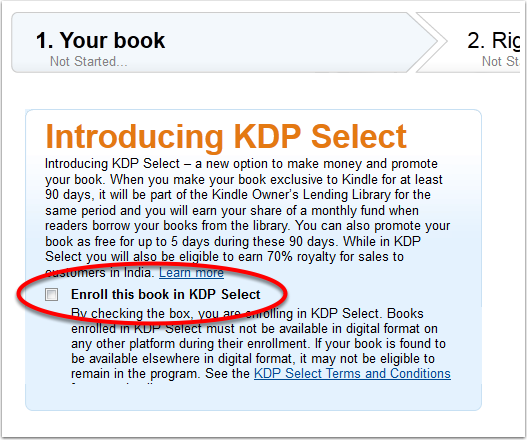
When you are publishing your book make sure to put a check in the box labelled Enroll this book in KDP Select. Then go through your publication process to finishing publishing your book on Amazon.
Return to the KDP Dashboard.
Go to your Bookshelf and click your book title.
It will take you to your publication details.
In the yellow box, click Promotions Manager.
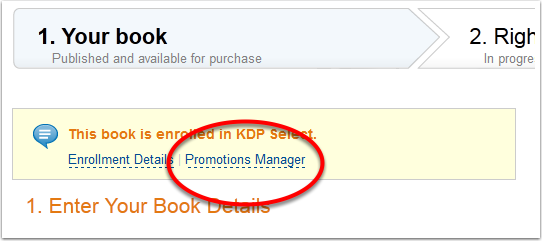
The Promotions Manager will open.
Click the new button.
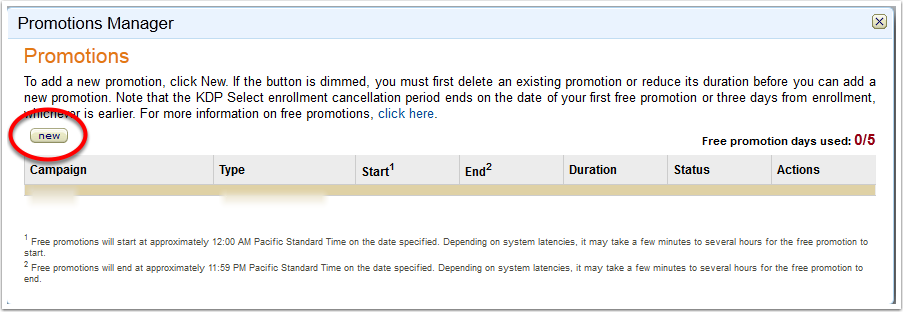
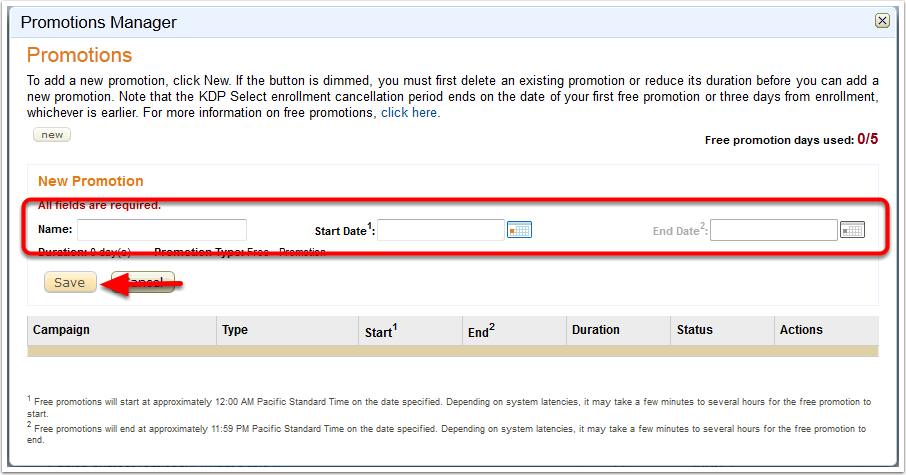
Now all you need to do is enter in your promo details-give your promo a name and then choose your dates.
Click Save.
You can come here to stop or edit your promotion at anytime, even while it is running.

© Alisa Foytik | Dreamstime.com
Fall is upon us and with it comes the impending holiday season. Readers are about to start buying a lot more more books-not to mention all the new Kindles that will be in use after the Winter Holidays.
Get a head start on this lucrative season by making sure your book is at its best. Here’s how:
Now’s the time to fine tune your book blurb and make sure it really conveys the spirit of your book. It’s easy to tweak your description through Author Central and the changes will appear on your Product Page within hours. Put a short, descriptive phrase after your Title that hits the genre of your book. Readers will see this in search results and it will give you a head up on the competition.
For Example: Fang’s Moon (WereWonders Book #1, Paranormal Romance)
You can also add customer images to your page to increase interest from potential readers. They can be anything from pictures of your setting to readers who took pictures of themselves with your book. Create as much interesting content on your page as you can because customer engagement means sales for you.
When readers click on your hyperlinked name just below your book title they are transported to your Author page on Amazon. If you have not taken the time to fill this out, don’t wait another minute. (I’m going to hit the high points here. For a more in-depth look and step by step instructions, please see The Self Publishing Toolkit.)
Through Author Central you can:
Amazon will also list all of the books that you have written here, so this is a great way for a reader to get to know you at a glance.
If you are a member of KDP Select, run a two or three day promotion now. You’ll give your book a lot of exposure across Amazon and probably get a little hitch in your rankings as well. Schedule your promo at least a week in advance, more if possible.
Use the KDP Select Free Promo Resource page on this site to notify every possible site of your promotion. Take an hour or two and fill out all the submission forms. Last time I did it at McDonalds while my kids were in the Play Place. It did not take that long to go down the entire list. Even if I only get picked up by half the blogs, my exposure will have increased dramatically.
Use HootSuite to schedule all of your tweets ahead of time. This took me a max of 30 minutes to do using the list of Twitter Accounts on the KDP Select Free Promo Resource page. You can use Auto Schedule to spread your tweets over the length of your promotion which is essentially ‘set it and forget it.’ Once you have submitted all your information for your Free Promo, you can move on to other things and let the promo go on auto-pilot.
If you haven’t been blogging or Tweeting, now’s the time to get in gear. When curious readers come looking for your website or Twitter account, make sure you have something waiting for them. Create a comfortable atmosphere where readers will feel good about buying your book. This does not have to take a ton of time out of your day. Once blog post a week and a few tweets that you can set up in less than ten minutes a day will put you in a great position.
No, I’m not kidding. Now is the time to be writing. The kids (if you have them) are back in school (toddler parents will have to be creative, see McDonalds above) and NaNoWriMo starts November 1. Commit now and you can have a new book out by January, just in time to capitalize on all those brand new Kindles. If you need a little inspiration (or kick in the pants…) sign up for InkyBites’ NaNoWriMo Road Map Workshop and spend October getting ready to write in November.
Book sales may have slowed down this summer but all of that is about to change! Don’t miss out on this lucrative time for authors. Set aside a few hours a week to work on your promotional efforts and it will all pay off in your royalty checks!
© Ximagination | Dreamstime.com
We’ve all had those moments when the numbers on the KDP dashboard stubbornly refuse to move no matter how many times we hit refresh. Instead of waiting for sales to come to you, here are a some fundamental things you can do to to bring buyers to your book.
At first glance, these may seem basic but most authors overlook the obvious when their books aren’t moving. Ready to roll up your sleeves? Let’s get to work!
Your book cover is the first thing a customer sees on Amazon. If your book isn’t selling, chances are the cover has something to do with it.
The most important feature of your book cover is that it be legible at a small size. Your cover may be breath-taking full size but a blurry mess when reduced. Contrast is key when it comes to small covers, so view your cover at a small size as well as in greyscale because that is how readers see it on their Kindles. And yes, there are a lot of eInk Kindles in use!
Your cover must reflect your genre. Take a look at the covers for Amanda Hocking’s Watersong Novels. You know they are YA when you look at them. Now is not the time to be cutting edge or try to separate yourself from the pack.
Take a look at the covers on the best seller list in your genre. Then spend some time browsing through the images at Dreamstime to get ideas of what colors and images reflect your book. (Whether you are designing your own cover or not, create a lightbox and save the images you like for later use or to share with your designer.) You can find a list of very affordable designers at the Kindle Boards Yellow Pages.
For more information on book covers, please see Secrets to Super eBook Covers that Sell. You can also find detailed information on creating covers in The Self Publishing Toolkit.
Your book description is what motivates your potential buyer to sample or buy your book. If your book isn’t selling, your book description is a great, easy thing to tweak. So many authors waste this precious space by slapping a random sentence or two up and calling it a day. This is not good enough. Use this space to sell your book.
The most important thing to know about your book description is that it isn’t a summary of your book. It’s a tease meant to raise more questions than it answers. Do a little recon and look at the blurbs of books that are selling well. Make sure you style your text with bold and italics so that it is easy to read. You are essentially writing ad copy, so spend some time on it and tweak it until you’ve got it just right.
The easiest way to edit your book description is through Author Central. You can add bold and italics with a rich text editor. If you know a little html, you can also add headings and such. Your edits will also show up on your page within an hour or two versus having to wait a day or more through the KDP Dashboard. Once you edit your book description in Author Central, you can no longer edit it through the KDP dashboard.
Please don’t load up the front of your blurb with quotes from reviews. Put your reviews in the Editorial Reviews section of your Product Page. This is also accessible through Author Central.
Your book sample should be primed to sell. That means that it should not only be irresistible, but your writing should be front and center. Download your book sample and look at it from the reader’s perspective.
If you’ve got a lot of front matter taking up space in your sample, get rid of it. Put your dedications and appreciations at the end of your book or on your website. If you must put reviews, limit yourself to three at the most and they should be snippets, not the full text.
Your sample should be error free, well formatted and compelling. Pull the reader in so that they have to click the buy button to find out what happens next.
As long as you are offering a well written book, there are buyers out there for your book. Amazon is a sales machine; they have three hundred million credit cards on file and millions of people that access the site with the intention of purchasing books.
We’ve just covered three of the most important things that you can do to help your book sell-so remember when your book isn’t selling, you don’t have to sit back and take it. The beauty of digital publishing is that nothing is ever set in stone. Your book sales are under your control, so get to work!
 Are you tired of authors who tweet constant links to buy their book? Yeah, me too.
Some days, though, when your sales numbers on the KDP dashboard are stagnating, desperation kicks in and those buy my book posts look pretty tempting.
Resist.
There are other, much more effective ways to sell books and that’s what I’m going to cover in this post.
I’ll give you four easy to implement ways to get your books in front of your Twitter followers. (If you need more followers, see Getting Twitter Followers.)
If you need something to Tweet, write up a quick post and then tweet it out a few times throughout the day. You can use HootSuite (free) to schedule your tweets after you’ve written your post. Make sure you vary the text of your tweet, rather than sending out the same message over and over.
The benefit of this is that you are driving traffic to your website or blog where people can engage with your site. (Bonus points if you have a mailing list set up. If not, stayed tuned. I’m going to cover that in the not too distant future.) Make sure that you have your social media buttons set up so that they can follow you on Facebook, Pinterest, or Google +.
I know that writing a blog post takes time away from your regular writing schedule, but it’s worth it. Your post doesn’t have to be ultra deep and could be as simple as a photo you find inspirational. Take a moment to think about your books-what could you write about that relates to your book or your genre? Remember you are creating engaging content that helps people get comfortable with you and your writing. And when they like what they see, they’ll buy your book.
Writing blog posts also has the additional benefit of contributing to your site’s SEO. The more content you have on your site, the more Google love you get.
Bublish is a new service for authors that allows you to create an attractive book sample that you can share wit your Twitter followers. (See one of mine here.) You can send notifications to both Twitter and Facebook directly from Bublish. Bubbles are very quick and easy to create and the best part is that Bublish tweets your bubbles out to their followers as well. So it’s win/win.
You can also use your book bubbles to participate in #samplesunday on Twitter, so creating a couple of bubbles is a great investment of your time. (You’ll need an .epub version of your book. If you don’t have one, you can convert your file in Calibre, which is free.)
This is a great way to create good will. Retweet or respond to some tweets in your Twitter stream. You know how happy you get when someone retweets you? Exactly. This only takes a few minutes to do, so go ahead and pay it forward. You’re bound to make someone’s day!
Contests give you lots of chances to tweet as well as drive traffic to your blog and encourage retweets. You can use Rafflecopter (free)to set up your contests and manage the entries. I would advise that you do not give you book away. You want people to buy your book, so think up something else to give away. You could give out a few Amazon gift cards (which is a great way to get them to buy your book) or the chance to name a character in your next book. You could also do a ‘favorite things’ giveaway and list a few of your favorite things that you’ll send to the lucky winner.
Rafflecopter only takes minutes to set up and you can use it as an incentive to get Facebook likes or retweets from your Twitter followers.
See how easy that was?
 A good book cover pre-sells your book. We all know that, right?
But how do you know if you have a good cover?
It’s not about the image you choose or even the designer, it’s about understanding how Amazon displays your book cover. Whether you are using a Pro or DIYing it, you must understand these critical points to create a book cover that sells.
Your book displays on Amazon at 87 pixels across. That is not a lot of space, my friends.
Your book cover must look good at a small size.
Shrink your cover down before you publish and make sure that you can read the title, your name and get some sense of what the book is about at a small size.
Take a field trip to Amazon and browse through the books via the search function or the genre bestseller lists. Note the covers that look good and then determine why. You want a book cover that stands out in a line of covers other covers. This is not as hard to do as you might think. There are a lot of dark book covers on Amazon with titles in super skinny fonts. The minute you reduce that kind of book cover, you have an illegible mess. So no matter how beautiful your cover is full size, you have to have a beautiful thumb nail as well.
 One of the most critical components of your design is the amount of contrast between your background and your book’s title.
The majority of Kindles in use right now utilize the grayscale e-Ink display. I’ve placed the cover of the Self Publishing Toolkit to the left of this text in grayscale at 87 pixels wide. This is an approximation of how it would appear on a Kindle. The cover is easily readable, yet still manages to convey the theme of the book. (This cover was designed by Karri Klawiter of Art by Karri.)
Make sure you check and see if your cover displays well on an actual Kindle before you hit publish. If you don’t own one, use the Kindle Previewer or your graphic design program to covert your image to grayscale so that you can get a feel for how potential readers are seeing your cover when they are browsing on their Kindles.
The key to making money as a Self Publisher is to write a lot of books, preferably a series that hooks readers from the get go. Readers should be able to tell your related books at a glance-this is branding.
Branding should be one of your top priorities when you are designing a cover because it helps you to stand out in a very crowded field. If you have a series of books on Amazon, make sure that the covers connect to each other in some way and clearly indicate what number the book is in the series.
Many authors incorporate a graphic or stamp on their cover to indicate that the book is part of a series. Middle grade book series do this very well, so look to them for good examples. (Check out Brandon Mull’s Fablehaven Series for some really cool covers that are tied together by a common theme.)
Using a professional designer is a good idea for a lot of reasons. (My favorite is the time I saved!) But before you hire a designer, make sure you get references from previous customers. Find out what their experience was and what they liked about working with your potential designer. A good place to find excellent cover designers is the Kindle Boards Yellow Pages.
Self Publishing is booming business and a lot of service businesses have sprung up all over the place and it seems that all you need is a copy of Photoshop and a free blogger website to be a cover designer. So do your homework and know what you are getting as well as when you are getting it before you agree to pay for your cover.
If you want (brutally) honest feedback about your cover, you can post it over in the Writer’s Cafe on the Kindle Boards. There is an awesome community of writers, editors, and cover artists that will set you on the right path.
Any Questions? Let me know in the comments or contact me.


 FREEOrganized by topicAll the tools you need in ONE place.